
You Don't Need a Brick
Not complaining about someone mansplaining my phone

A few months ago I told my friend, Jason, that I bought a Brick. He told me that was a stupid waste of money.
Ok, he didn’t say stupid. It was implied!

Two weeks ago Jason taught me how to dumb down my phone.
Since this little experiment has benefitted me, I’m sharing it with you.
Below are the steps. Don’t look for a video demo. There isn’t one. You can find a Youtube or a Reel or a Tiktok. It just won’t be nearly as entertaining nor as endearing as me : ) Also, if you live near me, we can meet up and do this together.
Dock
Four apps max. I chose 3: phone, messages, and Gmail. Burner phone banal if you will.
Homescreen cull
The purge.
Make the apps quiver with fear and then hit the little ‘-’. You’ll get two options: Remove from Homescreen or Delete App. Jason mansplained that his method requires everything deleted from the home screen. Aesthetically, it’s like having clean kitchen counters. No tea kettle. No toaster. No coffee pot. No fruit bowl. No water pitcher. No mail pile. Nothing. Nada.
Widgets
Is everyone hanging out without me? I had no idea these existed! If you also didn’t know where these were, hold down the home screen until things shake, hit Edit in the top left, then Add Widget. Now search your apps for what you would want displayed on your screen. This is really why Jason had me delete everything from the home screen. If there is a widget, there’s a way better looking phone screen. Especially since some apps have multiple widget options so you can, to an extent, design what your screen looks like.
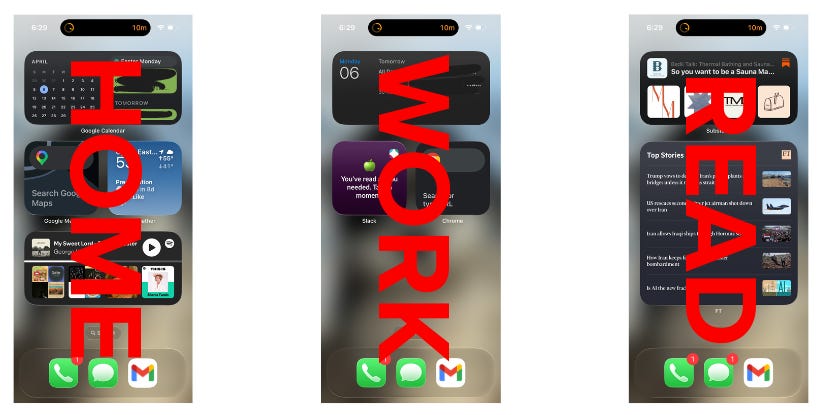
Mine:
Home screen: Google Cal, Maps, Weather, Spotify.
Work screen: Outlook, Slack, Chrome
Reading screen: Financial Times, Substack
Fair warning, not every app has a widget (this is a missed opportunity for The RealReal and Facebook marketplace). But their mistakes are saving me money : )
Focus modes
Swipe from the top right corner down toward the bottom left for the Focus screen. Apple gives you some defaults but Jason walked me through building custom ones, which is the move.
For each mode you choose: who gets through (people) and what gets through (apps).
My home setting is called “Graceland.” Smart activation is ON, tied to my location, so when I’m home, I’m in Graceland. “Work” focus runs on a schedule and location and allows notifications from colleagues and work related apps. For both Work and Graceland I have my Messages “filtered by focus.” This puts those people at the top of my texts and hides those who aren’t to limit distractions. I also have TAM Focus which means nobody is coming through. That’s the hour when my body is being designed and that requires no interruptions. Now, this doesn’t mean I don’t sometimes stop mid-workout and send Toni a voice memo about how I hate this week’s intermediate choreography and ask if MyMode is better. TAMily ties are hard to break.
🚨Wee-woo🚨Sometimes the Smart Focus doesn’t automatically turn on based on my location. I’ve opened my phone and seen a notification from someone and thought “you aren’t supposed to be here.”
Notifications
The last step is to keep your lock screen serene and notification free. Jason doesn’t allow messages to appear on his Lock Screen, and I’m following his lead. Also, out of habit, I still randomly check my phone so if there’s something, I’ll see it.
🚨Wee-woo🚨 Depending on what you select, you may miss time sensitive messages from people not in your focus groups. Is that a risk you are willing to take? I am…
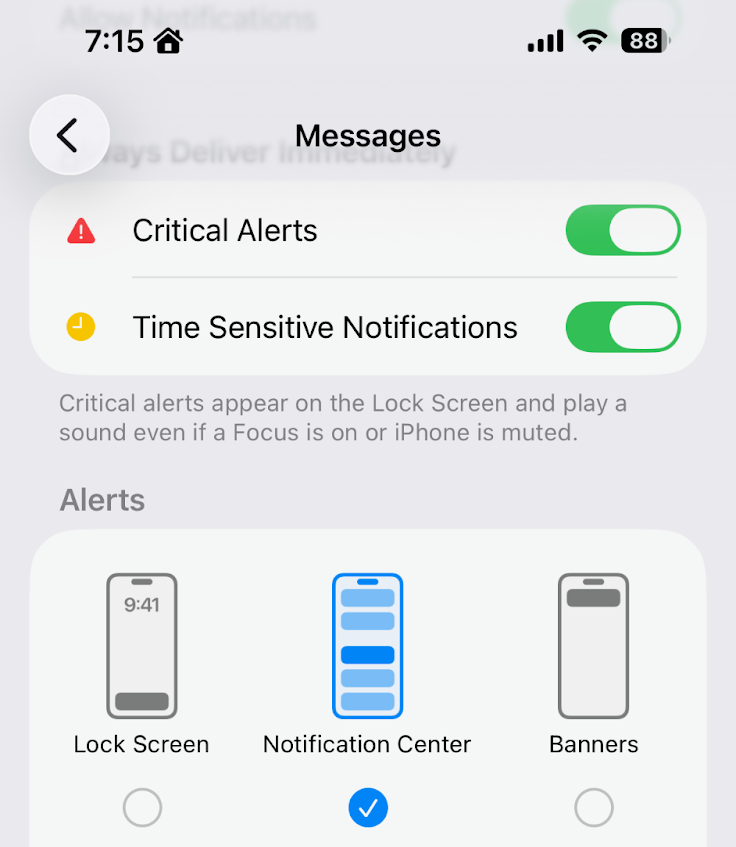
If none of this made sense. Whoopsy daisy! I was just trying to help.
Another idea that piqued my interest in my substack feed recently: “Bring back hanging up the phone.”
I like the idea, but aesthetically don’t align with the execution. I’d rather use the vintage bamboo basket that Kate gifted me and nearly got Bridget Jones 2 Edge of Reason’d over going through security checkpoints during her return from Japan. I just need a few more baskets so I can single white female Mari’s home entrance because Mari has 4 baskets of various sizes and I only have two. And why have two when you can have 3 or 4?
PS the only brick worth buying is BRIQUE, a shade in the new Westman Atelier Hydrobalm Tinted lipstick collection. Marisa wrote about them a few weeks ago and I’m slowly building up my collection. BRIQUE was purchased during a recent walk home as an attempt to pull myself together after ugly crying during Project Hail Mary.
I have been loving the scheduled summary feature where it basically holds and compiles all my notifications for two set times per day (I have mine set for 10am which is around when I walk my dog and 6pm which is right around when I start cooking dinner) and it’s like a perfect little digest summary of everything as I have a personal assistant pulling it together for me — very chic imo. I even put texts in there because it keeps more intentional about responding and less likely to leave my friends on read
i love this and i also love my brick!